# Some basic package imports
import numpy as np
import pandas as pd

# Packages for getting data from the web
# (these are already installed from requirements.txt on Day 1)
import requests
from bs4 import BeautifulSoup
import timeIntermediate Data Science
Web Scraping and Ethics in Data Acquisition
Intermediate Data Science
Important Information
- Email: joanna_bieri@redlands.edu
- Office Hours take place in Duke 209 – Office Hours Schedule
- Class Website
- Syllabus
Today’s Reading
The Ethics of Using Hacked Data: Patreon’s Data Hack and Academic Data Standards by Nathaniel Poor and Roei Davidson (Data & Society). It is a short case study, 7 pages. Read it and think about the questions on page 6, we talk about them in class.
Career Reading (for Tuesday 10/20)
Build a Career in Data Science, 2.2 Data Science Companies: Established Retailers. Read it and take notes, we discuss it at the start of class on Tuesday 10/20.
Welcome Back from Fall Break!
Today you start working with your NEW team. Homework 10 goes in the Week06 folder of your new team repo and it is due Sunday 10/25 at 11:59pm, the same day as Homework 11 and 12.
Final Project
Your Draft Proposal is due Sunday 10/25 at 11:59pm. It does not have to be formal! See the Final Project Information page for what to hand in and all of the due dates.
Where Does Data Come From?
So far this semester someone has handed us the data: a csv, a json file, an Excel sheet. In real life a lot of the data you want is sitting on a website, and you have to go get it. Today we look at how to do that AND how to do it responsibly. These two things go together. The way you collect data is the first ethical choice you make in a project.
Web scraping is the process of automatically extracting data from websites using code. It usually means sending a request to a website, getting back what it sends you, and pulling out just the parts you want.
Here is the order I go through when I want data from a website:
- Is there an official API or a download button? An API (Application Programming Interface) is a door the website builds on purpose so that code can ask for data. Lots of sites have one (eg. Wikipedia, the US Census, most government data portals, sports stats sites). If there is an API, use it and skip scraping all together.
- Is the page loading its data as JSON behind the scenes? Most modern websites send you a mostly empty page, and then JavaScript goes and gets the data as JSON. If you can find that request you can ask for the JSON yourself. This is my favorite trick and it works more often than you would think!
- Is the data right there in the HTML? Then we can use
requestsandBeautifulSoupto pull it out. This is the classic web scraping that you will see in most tutorials. - Only as a last resort: drive a real browser with code. Tools like Playwright and Selenium open a browser, let the JavaScript run, and then hand you the finished page. They are slow and a pain to set up, so I only use them when nothing else works.
We will go through these in a different order, starting with the HTML (3), because you need to understand what a web page is made of before the other options make sense.
Ethics of Web Scraping
There are some things to be aware of before you start scraping data from the web.
- Some data is private or protected. Just because you have access to a website’s data doesn’t mean you are allowed to scrape it. For example, when you log into Instagram or another social media site, you are granted special access to data about your connected people. It is unethical to use that access to scrape their private data!
- Some websites have rules against scraping and will cut off service to users who are clearly scraping data. How do they know? Web scrapers access the website very differently than regular users. If the site has a policy about scraping data then you should follow it and/or contact them about getting the data if you have a true academic interest in the data.
- The line between web scraping and plagiarism can be very blurry. Make sure that you are citing where your data comes from AND not just reproducing the data exactly. Always cite the source of your data and make sure you are doing something new with it.
- Ethics are different depending on if you are using the data for a personal project (eg. you just want to check scores for your favorite team daily and print the stuff you care about) vs if you are using the project for your business or website (eg. publishing information to drive clicks to your site/video/account or making money from the data you collect). In the latter case it is EXTRA important to respect the original owner of the data. Drive web traffic back to their site, check with them about using their data, etc.
The Ethical Scraper (from Towards Data Science - Ethics in Web Scraping):
I, the web scraper will live by the following principles:
- If you have a public API that provides the data I’m looking for, I’ll use it and avoid scraping all together.
- I will always provide a User Agent string that makes my intentions clear and provides a way for you to contact me with questions or concerns.
- I will request data at a reasonable rate. I will strive to never be confused for a DDoS attack.
- I will only save the data I absolutely need from your page.
- I will respect any content I do keep. I’ll never pass it off as my own.
- I will look for ways to return value to you. Maybe I can drive some (real) traffic to your site or credit you in an article or post.
- I will respond in a timely fashion to your outreach and work with you towards a resolution.
- I will scrape for the purpose of creating new value from the data, not to duplicate it.
Two things to check before you scrape
- The Terms of Service. Usually a link at the very bottom of the page. Search it for “scrape”, “crawl”, “robot”, or “automated”. Some sites say no scraping at all (eg. LinkedIn and Indeed both forbid it).
- The robots.txt file. Almost every website has a file at
/robots.txtthat tells automated programs which parts of the site they should stay out of. It is not a law, it is a request, but an ethical scraper follows it.
Let’s look at one!
# robots.txt is just a text file, so we can ask for it and print it
robots = requests.get("https://www.scrapethissite.com/robots.txt")
print(robots.text)
User-agent: *
Disallow: /lessons/
Disallow: /faq/This one says: any program (User-agent: *) should stay out of the /lessons/ and /faq/ pages. Everything else is fine. Bigger sites have much longer files, try looking at https://en.wikipedia.org/robots.txt in your browser.
If a site has no robots.txt at all you will get a 404 Not Found. That doesn’t mean anything goes! You still read the terms and you still scrape slowly.
Start with the URL
The first thing you should inspect when scraping is the website URL:
https://realpython.github.io/fake-jobs/jobs/senior-python-developer-0.htmlThe URL has two major parts:
- The base: https://realpython.github.io
- The path: /fake-jobs/jobs/senior-python-developer-0.html
The URL might also have query or pagination information included.
Query Parameters in URLs
Query parameters are key-value pairs that appear after a ? in the URL. Multiple parameters are separated by &.
https://example.com/search?q=laptophttps://example.com/search?q=laptop&sort=price_aschttps://news.example.com/archive?year=2023&month=10
Pagination in URLs
Pagination is when content is split across multiple pages. Usually one part of the URL counts up:
https://example.com/products?page=1,https://example.com/products?page=2https://quotes.toscrape.com/page/2/
When you want ALL the data you will need a loop that walks through the pages.
Developer Tools
The next thing you want to do is inspect the website with your browser’s developer tools. Developer tools let you see the HTML code that the website uses AND every request the page makes.
- Mac: press
Cmd + Option + I, or right-click on the page and choose Inspect - Windows/Linux: press
Ctrl + Shift + IorF12, or right-click on the page and choose Inspect
There are two tabs we will use today:
- Elements (Firefox calls it Inspector) shows the HTML. Hover over the code and the browser highlights the part of the page that code controls.
- Network shows every request the page makes after it loads. This is where we will find hidden JSON later.
Try this! Navigate to https://realpython.github.io/fake-jobs/ and look at the code in the Elements tab. Click on the drop down arrows to investigate the parts of the code. What do you notice about the organization of this site?
Basics of HTML for Web Scraping
Web scraping relies on understanding the structure of HTML (HyperText Markup Language), since most web pages present their content using HTML tags. Tags are nested inside each other like folders inside folders.
Common Tags
- Headings (
<h1>,<h2>, …<h6>): section titles - Paragraph (
<p>): blocks of text - Links (
<a href="...">): hyperlinks - Images (
<img src="...">): pictures - Lists (
<ul>,<ol>,<li>): ordered and unordered lists - Tables (
<table>,<tr>,<td>): tables - Divisions (
<div>) and Spans (<span>): generic containers used for layout
Attributes give extra information inside a tag:
id: a unique name for one elementclass: a label shared by elements with the same style or purposehref(in<a>): where the link goessrc(in<img>): where the image comes from
For scraping, class is the one you will use the most. Web designers give the same class to every job title, every price, every quote, and that is exactly how we find them!
<div class="product">
  <h2 class="title">Book Title</h2>
  <span class="price">$19.99</span>
</div>
Parse HTML with Beautiful Soup
When we get a web page with requests we get back one big string of HTML. We need a way to search through it. Beautiful Soup is a Python library for parsing HTML. Let’s practice on a small example first.
# Example HTML
html = """
<div class="product" id="p1">
  <h2 class="title">Book One</h2>
  <span class="price">$19.99</span>
  <a href="https://example.com/book1" class="buy-link">Buy</a>
</div>
<div class="product" id="p2">
  <h2 class="title">Book Two</h2>
  <span class="price">$24.99</span>
  <a href="https://example.com/book2" class="buy-link">Buy</a>
</div>
<img src="cover1.jpg" alt="Cover 1">
<img src="cover2.jpg" alt="Cover 2">
"""

# Parse HTML
example_soup = BeautifulSoup(html, "html.parser")
# 1. Find by tag name
info = example_soup.find_all("h2")
for i in info:
print(i) # the whole tag
print(i.name) # the tag name
print(i.attrs) # a dictionary of the attributes
print(i.text) # just the text
print('--------------------')<h2 class="title">Book One</h2>
h2
{'class': ['title']}
Book One
--------------------
<h2 class="title">Book Two</h2>
h2
{'class': ['title']}
Book Two
--------------------# 2. Find by class - notice the underscore in class_
first_product = example_soup.find("div", class_="product")
print(first_product)
print('--------------------')
all_products = example_soup.find_all("div", class_="product")
print(all_products)<div class="product" id="p1">
<h2 class="title">Book One</h2>
<span class="price">$19.99</span>
<a class="buy-link" href="https://example.com/book1">Buy</a>
</div>
--------------------
[<div class="product" id="p1">
<h2 class="title">Book One</h2>
<span class="price">$19.99</span>
<a class="buy-link" href="https://example.com/book1">Buy</a>
</div>, <div class="product" id="p2">
<h2 class="title">Book Two</h2>
<span class="price">$24.99</span>
<a class="buy-link" href="https://example.com/book2">Buy</a>
</div>]# 3. Find by id
product_p1 = example_soup.find("div", id="p1")
print(product_p1)<div class="product" id="p1">
<h2 class="title">Book One</h2>
<span class="price">$19.99</span>
<a class="buy-link" href="https://example.com/book1">Buy</a>
</div># 4. Nested find - search inside something you already found
product_price = first_product.find("span", class_="price").text
print(product_price)$19.99# 5. Get an attribute - use square brackets like a dictionary
link_example = example_soup.find('a')
print(link_example.text)
print(link_example['href'])Buy
https://example.com/book1Using .find() and .find_all()
.find()returns the first matching element..find_all()returns a list of all matching elements, so you usually loop over it.
BEWARE! class is a reserved word in Python, so Beautiful Soup uses class_ with an underscore. If you type class= you get a syntax error.
A Real Static Page
Now let’s try a real page. https://realpython.github.io/fake-jobs/ is a fake job board made for practice, so we can scrape it as much as we want.
URL = "https://realpython.github.io/fake-jobs/"
page = requests.get(URL)

# 200 means it worked, 404 means not found, 403 means they said no
print(page.status_code)

# This prints out the whole website code
# print(page.text)200soup = BeautifulSoup(page.text, "html.parser")
# In the developer tools we saw that all the jobs sit inside id="ResultsContainer"
results = soup.find(id="ResultsContainer")
job_cards = results.find_all("div", class_="card-content")
print(len(job_cards))
# Lets look at the first job card
print(job_cards[0].prettify())100
<div class="card-content">
<div class="media">
<div class="media-left">
<figure class="image is-48x48">
<img alt="Real Python Logo" src="https://files.realpython.com/media/real-python-logo-thumbnail.7f0db70c2ed2.jpg?__no_cf_polish=1"/>
</figure>
</div>
<div class="media-content">
<h2 class="title is-5">
Senior Python Developer
</h2>
<h3 class="subtitle is-6 company">
Payne, Roberts and Davis
</h3>
</div>
</div>
<div class="content">
<p class="location">
Stewartbury, AA
</p>
<p class="is-small has-text-grey">
<time datetime="2021-04-08">
2021-04-08
</time>
</p>
</div>
<footer class="card-footer">
<a class="card-footer-item" href="https://www.realpython.com" target="_blank">
Learn
</a>
<a class="card-footer-item" href="https://realpython.github.io/fake-jobs/jobs/senior-python-developer-0.html" target="_blank">
Apply
</a>
</footer>
</div>
jobs = dict()

for i, job_card in enumerate(job_cards):
    # Get the information from each job card
    title_element = job_card.find("h2", class_="title")
    company_element = job_card.find("h3", class_="company")
    location_element = job_card.find("p", class_="location")
    # Add the information to the dictionary
    # .strip() removes the extra spaces and newlines around the text
    jobs[i] = {'job': title_element.text.strip(),
               'company': company_element.text.strip(),
               'location': location_element.text.strip()}

df = pd.DataFrame(jobs).T
df| job | company | location | |
|---|---|---|---|
| 0 | Senior Python Developer | Payne, Roberts and Davis | Stewartbury, AA |
| 1 | Energy engineer | Vasquez-Davidson | Christopherville, AA |
| 2 | Legal executive | Jackson, Chambers and Levy | Port Ericaburgh, AA |
| 3 | Fitness centre manager | Savage-Bradley | East Seanview, AP |
| 4 | Product manager | Ramirez Inc | North Jamieview, AP |
| ... | ... | ... | ... |
| 95 | Museum/gallery exhibitions officer | Nguyen, Yoder and Petty | Lake Abigail, AE |
| 96 | Radiographer, diagnostic | Holder LLC | Jacobshire, AP |
| 97 | Database administrator | Yates-Ferguson | Port Susan, AE |
| 98 | Furniture designer | Ortega-Lawrence | North Tiffany, AA |
| 99 | Ship broker | Fuentes, Walls and Castro | Michelleville, AP |
100 rows × 3 columns
This is the pattern for almost every static scrape:
requests.get()the pageBeautifulSoup()the text- find the container that holds each item (here a job card)
- loop over the items and
findthe pieces inside each one - put it all in a DataFrame
You Try
Extract the application link for each of the jobs and add it to the data frame as a column named “application link”. HINT: look at the <a> tags inside a job card. There are two, you want the one that says Apply.
# Your code hereShortcut for Tables: pd.read_html
If the data you want is in an HTML <table>, pandas can do all the work for you. pd.read_html finds every table on the page and returns a list of DataFrames.
from io import StringIO

URL = "https://www.scrapethissite.com/pages/forms/"
page = requests.get(URL)

# read_html wants the html wrapped in StringIO
tables = pd.read_html(StringIO(page.text))
print(len(tables))
tables[0].head()1| Team Name | Year | Wins | Losses | OT Losses | Win % | Goals For (GF) | Goals Against (GA) | + / - | |
|---|---|---|---|---|---|---|---|---|---|
| 0 | Boston Bruins | 1990 | 44 | 24 | NaN | 0.550 | 299 | 264 | 35 |
| 1 | Buffalo Sabres | 1990 | 31 | 30 | NaN | 0.388 | 292 | 278 | 14 |
| 2 | Calgary Flames | 1990 | 46 | 26 | NaN | 0.575 | 344 | 263 | 81 |
| 3 | Chicago Blackhawks | 1990 | 49 | 23 | NaN | 0.613 | 284 | 211 | 73 |
| 4 | Detroit Red Wings | 1990 | 34 | 38 | NaN | 0.425 | 273 | 298 | -25 |
One line and we have a DataFrame! Always check for a table before you write a big Beautiful Soup loop.
NOTE: This page only shows the first 25 teams. The rest are on other pages, look at the URL when you click on page 2.
Static vs. Dynamic Websites
When we call requests.get() we get whatever the server sends back, and nothing more. We do NOT get anything that JavaScript adds to the page after it loads.
- Static websites send the full content in the HTML. What you see in the browser is in
page.text. Everything we did above works. - Dynamic websites send a mostly empty page, then JavaScript goes and gets the data and adds it to the page. What you see in the browser is NOT in
page.text.
The quotes practice site has both kinds. They look the same in your browser. Let’s see what requests gets.
static_page = requests.get("https://quotes.toscrape.com/")
dynamic_page = requests.get("https://quotes.toscrape.com/scroll")

static_soup = BeautifulSoup(static_page.text, "html.parser")
dynamic_soup = BeautifulSoup(dynamic_page.text, "html.parser")

# Count the quotes in each one
print("static: ", len(static_soup.find_all("div", class_="quote")))
print("dynamic:", len(dynamic_soup.find_all("div", class_="quote")))
static: 10
dynamic: 0Zero quotes! The dynamic page looks exactly the same in the browser, but the quotes are not in the HTML. Beautiful Soup can’t find what isn’t there.
So where are they?
You Try
Scrape the first page of https://quotes.toscrape.com/ (the static page) with Beautiful Soup. Make a DataFrame with a column for the quote text, the author, and the tags. Then compare it to the first 10 rows of quotes above. Do they match?
# Your code hereLast Resort: Driving a Browser
Sometimes there is no API, the HTML is empty, and you can’t find the JSON (eg. the site scrambles its requests, or you have to click buttons to get the data). Then you can use code to open a real browser, let the JavaScript run, and grab the finished HTML. The two main tools are Playwright (newer, what I would try first today) and Selenium (older, lots of tutorials online). Selenium is already in our requirements.txt if you want to try it.
You do NOT need to run this, and it takes some setup on your computer (you need Chrome installed). Here is what it looks like with Selenium:
from selenium import webdriver
from selenium.webdriver.chrome.options import Options
from selenium.webdriver.chrome.service import Service
from webdriver_manager.chrome import ChromeDriverManager

options = Options()
options.add_argument("--headless=new")   # don't open a window

# webdriver_manager downloads the driver that matches your Chrome
service = Service(ChromeDriverManager().install())
driver = webdriver.Chrome(service=service, options=options)
driver.get("https://quotes.toscrape.com/js/")
time.sleep(3)                            # wait for the JavaScript to run

# Hand the finished page to Beautiful Soup, just like before
soup = BeautifulSoup(driver.page_source, "html.parser")
driver.quit()

len(soup.find_all("div", class_="quote"))   # now there are 10
Notice that once you have the HTML, it’s the same Beautiful Soup code as before. The browser is just a slow, heavy way of getting the HTML.
Challenges in Web Scraping
- Websites change. Rename one class and your code breaks. Scraping code needs maintenance.
- Anti-scraping measures. CAPTCHAs, rate limits, and blocked IP addresses. If a site is working hard to stop you, that is a strong hint that they don’t want you there!
- Messy data. Scraped text comes with extra spaces,
$signs, commas in numbers, and missing pieces. Everything from Day 4 on data cleaning applies.
Practice! Practice! Practice!
The more you practice web scraping the better you will get at dealing with the curveballs that get thrown your way. These sites are built for practice:
- https://www.scrapethissite.com/pages/
- https://webscraper.io/test-sites
- https://realpython.github.io/fake-jobs/
- https://books.toscrape.com/
- https://quotes.toscrape.com/
https://www.wikipedia.org/ is NOT a fake site, but it is good for practice. Please follow their rules: https://wikitech.wikimedia.org/wiki/Robot_policy. Basically this means don’t send too many requests, and if you are looking for large amounts of data use the API.
Data Management and Ethics
In my mind data management and ethics go hand in hand, even though they are two very different sides of the same coin.
Data management is the process of collecting, storing, organizing, maintaining, and using data efficiently and securely throughout its lifecycle. Examples: creating databases, backing up data, checking data quality, controlling who has access, and following privacy laws.
Data ethics deals with the moral principles and values guiding how data is collected, used, shared, and interpreted. Examples of data ethics questions:
- Is it ethical to collect data without informed consent?
- Are algorithms being used in a way that’s fair and unbiased?
- Who benefits or is harmed by a data-driven decision?
- Are individuals’ rights and dignity being respected?
Where They Meet
- Privacy and Security: data management sets up secure systems to protect personal data. Data ethics asks whether collecting or storing that personal data is appropriate in the first place.
- Governance: data management creates rules for who can access data. Data ethics asks if those rules are fair.
- Accuracy and Honesty: data management makes sure the data is clean and correct. Data ethics makes sure you report it truthfully.
Example: Imagine your school collects data about students’ grades and attendance. Good data management keeps that information safe, organized, and accurate. Good data ethics makes sure it’s only used for fair reasons, like helping students succeed, not for unfair judgment or discrimination.
The Research Data Lifecycle
Research data goes through several stages, from planning a project to sharing your results. As a data scientist you might be involved in any of these stages.
From https://data.library.arizona.edu/data-management/best-practices
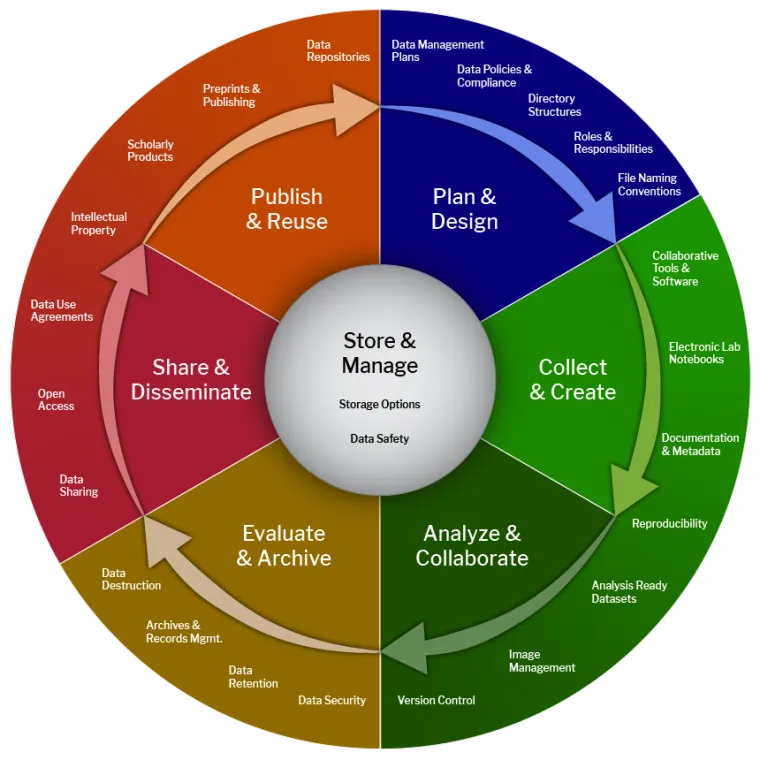
Plan & Design. Decide how you will collect, store, and share your data BEFORE you start. Organize your folders and files:
- Avoid spaces in your file and folder names.
- Name folders and files so they are easily findable.
- Add a README.md file to your folders describing what is in them.
Collect & Create. Find existing datasets you can reuse, and cite any data or code you use from others. Know who owns the data, what license protects it, and any rules for using it. For scraped data this means: which website, when you scraped it, and what their terms said.
Sometimes citations are discipline specific, but in general you should follow APA or MLA guidelines. For example:
“Title of Webpage.” Website Name, Publisher (if different), Publication Date, URL. Accessed Date.
“Quotes to Scrape.” Zyte, https://quotes.toscrape.com/. Accessed 6 Oct. 2026.
Analyze & Collaborate. Keep your data and files organized so others can understand your work. Document your data (README.md). Protect confidential or sensitive data. Tools like GitHub and the Open Science Framework (OSF) help you share and track your work with collaborators.
Evaluate & Archive. Use secure storage and backups. Archive your final datasets in trusted repositories like Zenodo or OSF. These sites can give your data a DOI (Digital Object Identifier), a permanent ID that always points to your data no matter where it moves on the internet.
Share & Disseminate. Respect copyright and licensing rules, publish your data so others can reproduce your work, and write clear documentation so others can use it. Your team write-ups are a small version of this!
The FAIR Principles
FAIR stands for Findable, Accessible, Interoperable, and Reusable. Think of it as a checklist for good data practices.
- Findable: easy to find for humans and computers. Give it a clear name and a description (eg.
student_survey_2025.csvinstead ofdata.csv) and a DOI if you publish it. - Accessible: people can get it with standard tools, and you say how to get permission if it is restricted (eg. shared on GitHub or OSF with instructions).
- Interoperable: works with other datasets and software. Use standard formats (eg.
.csvinstead of a proprietary format) and labels other people understand. - Reusable: documented well enough that someone else can use it. Include a README and a license (eg. CC-BY says others can reuse it if they give you credit).
Data Ethics
Why is data ethics such a big deal? When governments, companies, and even individuals have the power to collect and analyze huge amounts of data, they also have the power to impact lives, for better or for worse.
Principles of Big Data Ethics
- Transparency: people providing data should understand how their data is being used. They should not need to be lawyers to understand.
- Accountability: data scientists and organizations are responsible for the data they collect, and for making sure it is not misused or breached.
- Individual Agency: individuals should have control over their personal data. They should be able to access, update, or remove their data from a dataset.
- Data Privacy: privacy should be the expectation. Data should be protected from unauthorized access and use.
Public vs. Private Data
Public data is available to anyone (eg. government statistics, public posts, open datasets). Even if data is public, consider the context: was it shared with the expectation that it would be collected and analyzed? Avoid re-identifying individuals in datasets that appear anonymous.
Private data is collected from individuals with limited access (eg. medical records, student grades, private messages). It requires consent, confidentiality, security, and you only use it for the reason it was collected.
Key Principle: Just because data is technically accessible doesn’t mean it is ethically okay to use it without consent. This is the web scraping rule from above!
Data Aggregation
Data aggregation is combining data from multiple sources. It is super useful, and it is also where a lot of ethical problems start:
- Privacy risks. Combining datasets can re-identify people who were anonymous in each dataset on its own. (eg. Latanya Sweeney showed that zip code + birth date + gender is enough to identify about 87% of people in the US.)
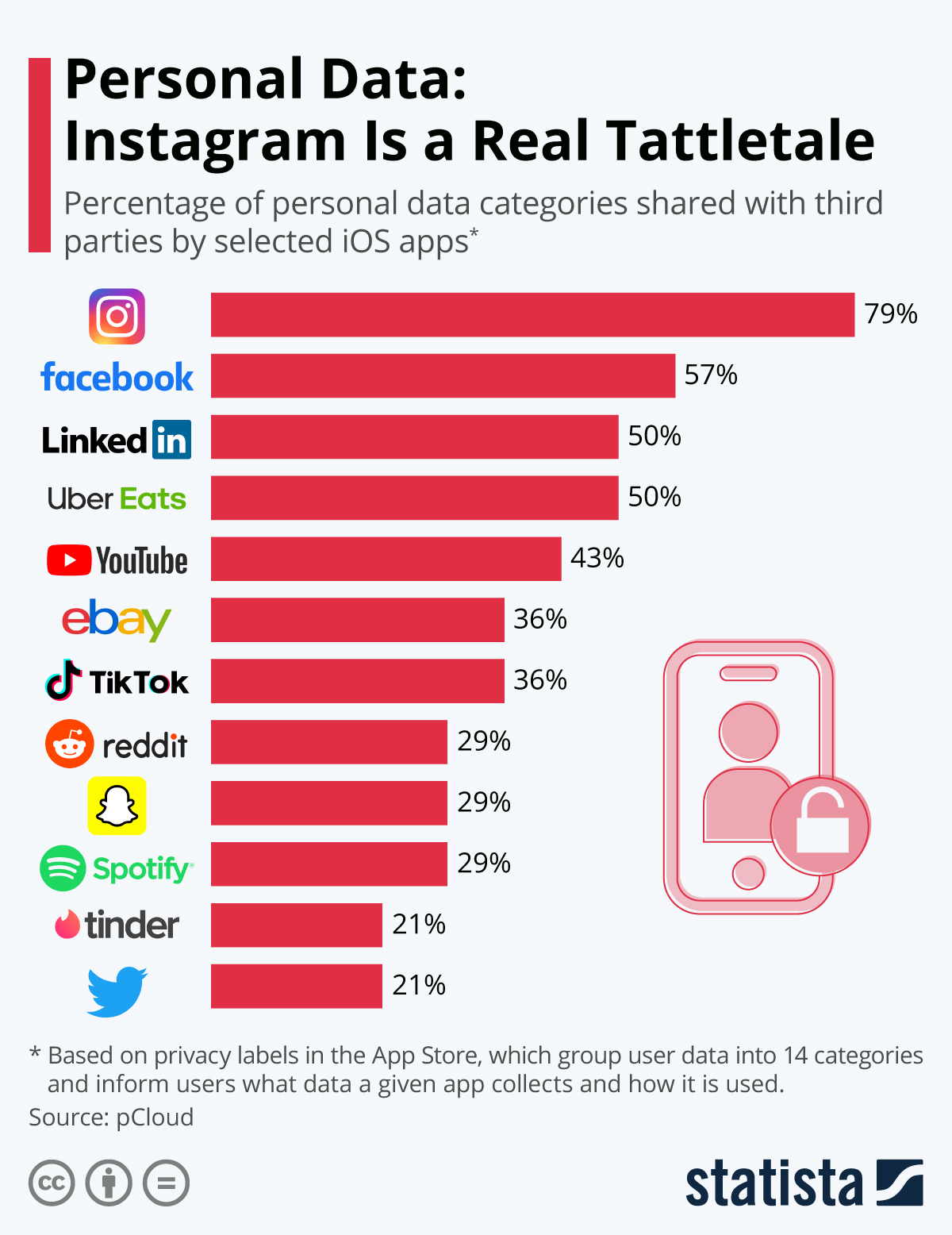
- Consent. People may have agreed to share data with one app, not to have it combined with everything else.
- Bias. Combined datasets can over-represent or under-represent groups (eg. adding social media data undercounts people who are not online).
Notice that scraping is often aggregation. Each post on a site is public, but a scraper that collects every post by one person over five years makes something new that the person never shared.
Some case studies
From Data Camp - Intro to Data Ethics:
- Hiring algorithms at Amazon. Starting in 2014 Amazon built an internal algorithm to decide which resumes made it to the next hiring stage. It learned from historical hiring data and ended up penalizing resumes from women for technical roles. Amazon scrapped it.
- Facial recognition. In 2018, research showed that commercial facial recognition made far more mistakes on darker-skinned women (error rates up to 34%) than on lighter-skinned men (under 1%). This is the Gender Shades study by Joy Buolamwini and Timnit Gebru.
- Apple Card. In 2019, several people reported that the credit card algorithm gave men much higher credit limits than their wives, even when they shared assets.
- Uber’s “God View”. In 2014, reports claimed Uber employees could look up any rider’s trips, and used it to track celebrities, politicians, and ex-partners.
From Statista.com
What would you do?
These are the kinds of things you could run into as a data scientist:
- Your boss tells you to do an analysis that will be used for decision making even after you have warned about strong bias in the data. Should you give your boss the analysis? What if your job is on the line?
- You notice that people you work with are not being careful with access to very private data because following the rules slows down their work. Should you say something? Even if the chance of a hack is low?
- You are doing academic research and have struggled to get the data you need when suddenly hackers publish the exact data you need. Should you use it? Is all of it okay to use?
- You found an awesome data set online and used it to build an awesome algorithm. The data has a Share-Alike license that says anything created from it must be released under the same license. But you did so much work and could really make a lot of money. Should you try to sell it anyway?
- You can get the data you need by scraping a site whose terms of service say no scraping. The data is public and you only need it for a class project. Is it okay?
Data Ethics could be a WHOLE class!
This is just the tip of the iceberg. These themes will come up as we continue on in DATA 201, especially when we start building models next week, and hopefully this lecture builds on your thinking from DATA 101. I strongly encourage you to take a data ethics class!
Homework 10
The full assignment is in HW_day10.ipynb in your sandbox. The short version: scrape the quotes site two ways (the HTML and the hidden JSON), check that you get the same answer, and then write a short ethics check for a website you would like to get data from.
Work the problems in your sandbox and push it, your sandbox is your backup. Your write-up notebook goes in Week06 of your NEW team’s repo. Homework 10 is due Sunday 10/25 at 11:59pm, the same day as Homework 11 and 12.